


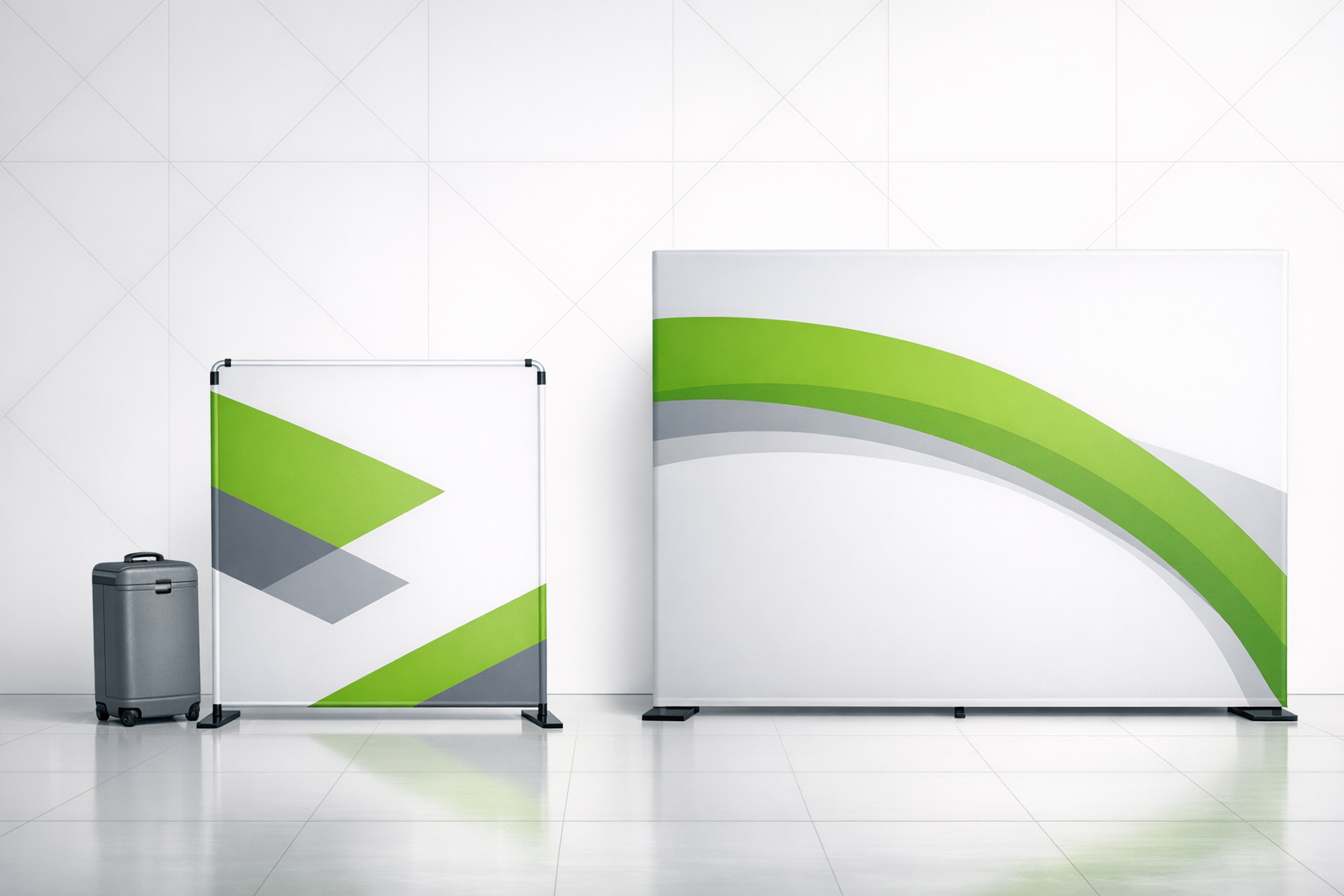
Common Exhibition Display Questions Answered
Exhibition displays are essential for making your brand stand out at trade shows and events. Whether you’re showcasing products or generating leads, the right display can make a big difference. TRIGA® Displays offers two standout options: TRIGA® GO for lightweight, portable setups and TRIGA® MAX for larger, more complex designs. Here’s what you need to know:
- TRIGA® GO: Best for small to medium displays, quick setup (as little as 5 minutes), and easy transport in compact bags. Maximum height: 8.2 feet.
- TRIGA® MAX: Designed for large-scale events, supports heavy loads like LCD screens, and offers flexible configurations, including curved walls. Maximum height: 16.4 feet.
- Both systems use lightweight aluminum frames and tensioned fabric for a wrinkle-free finish.
Costs range widely:
- Portable displays: $200–$3,000
- Modular systems: $5,000–$30,000
- Custom exhibits: $10,000+
Setup is tool-free and straightforward, making it easy for even first-time users. Graphics are easy to replace, and the systems are durable enough to last for years. Whether you’re creating a trade show booth, pop-up store, or event backdrop, TRIGA® Displays provide practical solutions for professional results.
TRIGA® Displays Product Features
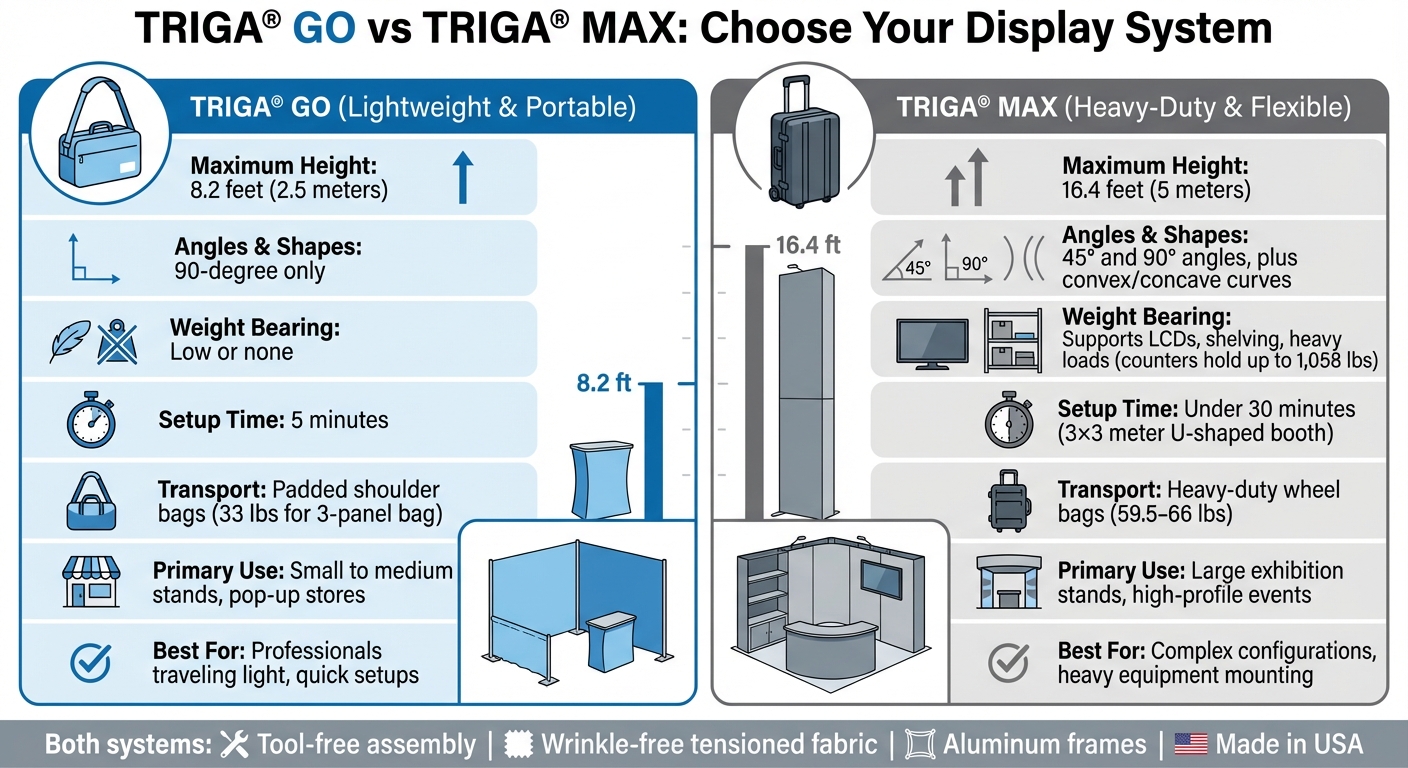
TRIGA GO vs TRIGA MAX Exhibition Display Systems Comparison
TRIGA® Displays offers two main product lines to suit different exhibition needs, each designed with unique features and applications in mind. These systems vary in size, structural flexibility, and intended use.
TRIGA® GO: Lightweight and Portable Design
TRIGA® GO is crafted for professionals seeking a portable, lightweight display solution. Its modular frames are constructed from lightweight aluminum and can be packed flat into padded shoulder bags. For instance, the TRIGA® GO 3-panel bag can hold up to 15 kg (about 33 pounds), making it perfect for individuals or small teams traveling light.
The system accommodates structures up to 8.2 feet (2.5 meters) tall and features exclusively 90-degree configurations. Setting up a TRIGA® GO totem takes just about 5 minutes and requires minimal training. Integrated tensioning devices elevate the crossbar by 30 mm, ensuring the fabric remains smooth and wrinkle-free.
Thanks to its affordability and portability, TRIGA® GO is ideal for small to medium-sized stands or pop-up stores. However, for setups requiring greater load capacity or more complex configurations, TRIGA® MAX provides a more robust alternative.
TRIGA® MAX: Tensioned Textile System
For larger installations and high-impact events, TRIGA® MAX steps in with enhanced capabilities. Designed for large-scale exhibitions, it supports structures as tall as 16.4 feet (5 meters) and allows unlimited length configurations. Unlike TRIGA® GO, this system handles intricate shapes, including 45° angles as well as convex and concave curves. Its counters can support up to 1,058 pounds (480 kg), making them suitable for LCD screens, shelves, and brochure racks.
One standout feature of TRIGA® MAX is the button-activated TRIGA box, which applies tension to fabric surfaces with a single press, ensuring a smooth, wrinkle-free finish. A 3×3 meter U-shaped booth can be assembled in under 30 minutes. For transport, heavy-duty wheel bags accommodate up to three modules, with weights ranging from 59.5 to 66 pounds (27 kg to 30 kg), depending on the bag’s length.
| Feature | TRIGA® GO | TRIGA® MAX |
|---|---|---|
| Maximum Height | 8.2 feet (2.5 meters) | 16.4 feet (5 meters) |
| Angles & Shapes | 90-degree only | 45° and 90° angles, plus curves |
| Weight Bearing | Low or none | Supports LCDs, shelving, and heavy loads |
| Transport | Padded shoulder bags | Heavy-duty wheel bags |
| Primary Use | Small to medium stands, pop-up stores | Large exhibition stands, high-profile events |
With these features, TRIGA® Displays ensures exhibitors have the tools they need to create seamless, professional displays with ease.
Assembly Instructions for TRIGA® Displays
Thanks to their clever design, both TRIGA® GO and TRIGA® MAX are incredibly easy to assemble. These systems are built with a tool-free assembly process, meaning you won’t need screws, bolts, or any special tools. The modular parts are designed to slot, snap, or interlock effortlessly, allowing even first-time users to set them up with ease. It’s all about making the process quick and professional without the headaches.
How to Set Up TRIGA GO
Start by unpacking and organizing the four main components: feet, uprights, crossbars, and graphic rails. Having these ready to go will make the snap-together process faster and smoother. Next, connect the feet, uprights, and crossbars to form the frame. Once the frame is complete, slide the sleeved graphic onto the rails.
The final step is to activate the tensioner. This patented mechanism tightens the textile, eliminating any wrinkles and giving the display a polished look. Most TRIGA® GO displays can be fully assembled in under 30 minutes. According to TRIGA® Displays, “With minimal training, your team can set the system up on their own within 5 minutes”.
How to Set Up TRIGA MAX
For larger or more complex setups, TRIGA® MAX offers a similar modular system but with an interlocking component design tailored for bigger structures. Begin by organizing the uprights, crossbars, feet, and graphic rails. Then, snap the components together – no tools required.
One standout feature of TRIGA® MAX is the button-activated TRIGA box. Once the frame is assembled and the graphic is in place, press the button to apply seamless tension to the fabric. This self-tensioning system ensures a smooth, wrinkle-free finish every time. For example, a standard 3×3 meter U-shaped booth can be set up in less than 30 minutes, and the system can even reach heights of up to 16.4 feet (5 meters) without needing extra equipment.
Durability and Lifespan of TRIGA® Displays
Materials and Construction Quality
TRIGA® displays are crafted using aluminum extrusions and polyester fabrics, making them ideal for frequent travel and repeated setups. The aluminum frames are lightweight and resistant to rust, offering a sturdy foundation that holds up over time. Carefully designed angles enhance stability and help minimize wear and tear.
The polyester fabrics are digitally printed and designed to stretch tightly across the frame without tearing. Unlike rigid panels, these textiles can be folded and stored without causing permanent damage. A patented tensioning system ensures the fabric stays taut, preventing sagging and reducing the risk of fabric fatigue over time. As noted by Production Prints:
TRIGA Displays that I have sold 10 years ago are still alive-and-well today and still making their rounds on the Trade Show circuit across the country and around the world.
The system is made up of four modular components – feet, uprights, crossbars, and graphic rails – that snap together without the need for screws or bolts. This eliminates the risk of hardware stripping during assembly. Additionally, TRIGA® frame extrusions and printed graphics are made in the USA, ensuring reliable quality and durability. These features make maintenance straightforward and allow for easy updates to your display.
Maintenance and Replacing Graphics
Thanks to its modular design, TRIGA® displays allow you to update textile graphics without replacing the aluminum frame. The fabric “skins” come with rubber edging that fits securely into the graphic rails. By deactivating the tensioner, you can swap out the graphics in seconds, keeping your branding fresh without the need for a full system replacement.
For cleaning, spot-treat with mild detergent, or machine-wash in cold water and air-dry to avoid heat damage. When storing, fold the prints with the printed side inward, ensuring they are completely dry to prevent mold. The displays are also fully recyclable, offering a no-waste solution. If you frequently ship your displays, consider upgrading to a hard travel case with wheels to protect the aluminum components during transit. The high-quality materials and easy graphic replacement process ensure a polished, professional look for every event.
Customization Options for TRIGA® Displays
Size and Configuration Options
TRIGA® Displays are designed to adapt to a variety of exhibition spaces, thanks to modular components that easily snap together – no tools required. TRIGA® Go configurations start at compact widths of just 3.3 feet and can stretch to an impressive 3,280 feet or more. Standard wall heights for TRIGA® Go include 6.6 feet, 7.4 feet, and 8.2 feet, while TRIGA® Max structures can reach towering heights of up to 16.4 feet. This flexibility lets you create layouts ranging from straight walls to L-shaped, U-shaped, or even fully enclosed box configurations, depending on your booth design.
TRIGA® Go works best for small to medium setups with 90-degree angles, making it perfect for totems, towers, counters, and classic booth shapes [4,21]. On the other hand, TRIGA® Max takes customization a step further by allowing curved walls (both convex and concave), 45-degree angles, and even weight-bearing features to support mounted LCD screens or shelving. For example, a 10×10-foot U-shaped TRIGA® Max Shellmount booth can be assembled in less than 30 minutes.
For specialized needs, the Shellmount system integrates seamlessly with standard exhibition shells, providing smooth graphic displays, while Wallmount options are ideal for permanent retail or commercial setups. If your display needs to handle heavier components like monitors or brochure racks, TRIGA® Max is built to accommodate those demands. Meanwhile, for professionals who prioritize portability, TRIGA® Go offers ultra-lightweight parts that pack down compactly [4,11]. Together, these modular configurations pave the way for equally adaptable graphic design possibilities.
Graphic Design and Printing Options
TRIGA® Displays don’t just offer flexible dimensions – they also provide cutting-edge graphic customization. Using full-color dye-sublimated fabric prints, TRIGA® ensures vibrant, professional-quality visuals. You can opt for double-sided printing to make your branding visible from multiple angles. Additionally, seamless large-scale graphics can span multiple frames without gaps; for instance, a single 20-foot graphic can stretch across two 10-foot frames flawlessly [4,20,8].
For an elevated presentation, backlit SEG (Silicone Edge Graphic) panels with LED lighting – either ladder-style or edge-lit – are available [20,5]. Beyond walls, you can customize branded counter tops and closed-back counters with graphics that wrap around all four sides [8,20]. These fabric graphics, or “textile skins”, are easily interchangeable, allowing you to refresh your messaging for new campaigns without the hassle of returning frames to the manufacturer [4,5,8].
To ensure the best results, all artwork must be submitted as print-ready PDFs with fonts embedded or converted to outlines, images at 300dpi, and colors in CMYK mode [22,23]. Official print templates help define bleed zones and show how graphics will wrap around the structure [22,23]. If needed, professional design services are available to help craft layouts tailored to your brand.
Looking to add an extra touch? Consider integrating QR codes on printed totems to encourage digital engagement or using textured prints and lifestyle imagery to create a distinct atmosphere for your brand.
sbb-itb-b68070b
Transporting TRIGA® Displays
Lightweight and Compact Design
TRIGA® Displays are made with lightweight aluminum, which makes them much easier to ship and handle compared to traditional rigid panels. The system is designed to break down into simple components – feet, uprights, crossbars, and graphic rails – all of which pack neatly into compact spaces. Thanks to their snap-together frames, there’s no need for heavy toolkits or specialized equipment during setup.
“Exceptionally light and compact a TRIGA® Go stand is a perfect travel companion.” – TRIGA® Displays
The fabric graphics used in TRIGA® Displays can be folded for storage, eliminating the need for bulky, rigid containers and reducing the amount of space needed for transit. For example, the TRIGA® Go 3-panel bag, designed for a 10-foot by 8.2-foot wall, weighs only 33 pounds. Smaller bags for totems or counters are even lighter, at just 11 pounds each. This compact and lightweight design allows you to transport displays in standard vehicles or even check them as airline luggage, making them a perfect solution for professionals who frequently travel. Additionally, each order includes versatile carrying options to accommodate these features.
Carrying Cases and Storage
Every TRIGA® order comes with soft travel bags that include wheels for easy mobility. These padded bags also have double shoulder straps, making it possible for one person to carry them with ease. For those shipping displays via freight or commercial carriers, there’s an option to upgrade to hard travel cases with wheels, offering added protection against impacts and damage during transit.
The modular design of TRIGA® Displays ensures that even large setups can be flat-packed efficiently. For instance, counters and towers can be broken down into just two carry bags, saving storage space. If you’re shipping counter tops through services like UPS or FedEx, you can opt for tops cut into smaller sections – such as splitting a 4×2-foot top into two 2×2-foot pieces – to make logistics simpler. To further streamline setup, it’s a good idea to pack similar components together, keeping uprights separate from crossbars.
“Dismantling rigid structures is time consuming and requires additional manpower and complex transportation logistics, but with TRIGA® stands, this becomes a thing of the past.” – TRIGA® Displays
Creating Better Visual Impact with TRIGA® Displays
TRIGA® displays are known for their simple setup, but they also shine when it comes to creating a polished, professional appearance. Here’s how to make the most of your display.
Getting Wrinkle-Free Graphics
The patented tensioning system in both TRIGA® Go and TRIGA® Max ensures your textile graphics stay smooth and wrinkle-free. The system works by using tensioners on the crossbars to push the graphic rails apart, keeping the fabric taut. Even if you fold your fabric prints for storage, the tensioning system automatically removes any creases during setup.
To achieve the best results, make sure the rubber edges of the fabric are fully seated in the graphic rails before activating the tensioner. Start by assembling the frame, attaching the graphics, and then activating the tensioners for even tension distribution. No special tools are required – on TRIGA® Max, you simply press a button, while TRIGA® Go uses an integrated press-down tensioner. If the fabric feels loose, you can easily release and re-engage the tensioner to adjust.
Once your graphics are perfectly tensioned, adding LED lighting can further enhance the display. Neutral white lights with a color temperature between 4,000K and 5,000K keep fabric colors accurate and vibrant. For the best results, choose lights with a Color Rendering Index (CRI) of 90 or higher to ensure your prints look vivid and true to their original design.
Using Accessories to Improve Your Display
After securing wrinkle-free graphics, accessories can take your display to the next level. Lighting options include LED clamp lights for walls and towers, adjustable spotlights, floor-mounted uplights, and backlighting with LED grids or ladder lights behind the fabric. Slim LED strips along the frame edges can also create a sleek, modern look. To avoid glare and keep visitors comfortable, position lights above eye level or use diffusers. A layered lighting approach – combining ambient, accent, and decorative lighting – can help you control the mood and highlight key areas of your display.
The TRIGA® Cable System adds another dimension by allowing you to suspend brochure holders, signs, or cut-out shapes in front of the textile skin using high-tensile steel cables. You can also incorporate modular shelving, product plinths, flat-screen TVs, or digital screens directly onto the display structure. These accessories attach with tool-free clamps and mounts, blending seamlessly with the frame for a clean, professional finish.
Summary
TRIGA® GO and TRIGA® MAX tackle exhibition challenges with a smart, tool-free, snap-together design. For example, TRIGA® GO totems can be set up in just 5 minutes with minimal training, while larger displays like TRIGA® MAX take less than 30 minutes to assemble. This fast and easy setup highlights TRIGA®’s focus on convenience and efficiency.
Crafted from durable aluminum and recyclable materials, TRIGA® MAX is built to handle heavy loads while allowing for quick graphic updates. The system is made of 99% aluminum and is fully recyclable, offering the strength to support LCD screens and shelving. Updating branding is simple – just swap out the textile graphics.
TRIGA® systems are also designed with portability in mind. TRIGA® GO components fit into compact carry bags: a 3-panel bag holds up to 33 lbs, while totem and counter bags carry 11 lbs each. The lightweight aluminum frames help cut shipping costs and eliminate the need for professional installation.
These systems are highly adaptable to different booth layouts. TRIGA® GO can handle structures up to 8.2 feet tall, while TRIGA® MAX reaches impressive heights of 16.4 feet. This flexibility makes TRIGA® Displays perfect for a variety of event spaces, from small setups to larger trade show booths. For instance, a 3×3 meter U-shaped booth can be assembled in less than 30 minutes.
FAQs
Which TRIGA® system should I choose for my booth size and goals?
When choosing the perfect TRIGA® system, consider your booth size, how portable it needs to be, and what you want to achieve. For smaller to medium-sized booths, TRIGA® Go is a great option. It’s lightweight, requires no tools, and works well for setups up to 2.5 meters tall. If you’re aiming for larger, more robust displays, TRIGA® Max is the way to go. It features modular, self-tensioning frames that can reach heights of up to 5 meters. Both systems are designed to align with your branding needs, offering flexibility and making a strong visual impact.
What should I budget for a full TRIGA® display setup?
When planning for a TRIGA® display setup, you should allocate a budget ranging from $1,500 to $3,000. The final cost will vary based on the size and complexity of your configuration. If your setup is larger or includes more intricate elements, expect the price to be closer to the upper end of that range.
How do I prepare print-ready artwork for TRIGA® fabric graphics?
To get your artwork ready for TRIGA® fabric graphics, make sure your file is a PDF with all fonts either embedded or converted to outlines. Use high-resolution images in CMYK color mode with a minimum of 300dpi. Follow the bleed and safe area guidelines carefully to prevent any cropping issues. When submitting, include your order number in the email. For files larger than 5MB, use a file-sharing service like Wetransfer or Dropbox to send them.